Sample screen
Rolls and swing
Repeat the start of a slice for stutters and risers, and give the track a shuffle.
Two ways to change the feel of a pattern without moving its blocks by hand: a roll repeats one hit quickly, swing shifts the timing of the whole track.
The idea of a roll
A roll turns one block into a row of fast repeats of the same sound: the stutter of a vocal, a snare roll before a drop, a riser.
Three lengths are involved, and it helps to keep them apart:
- the rate: how often the sound restarts (every 1/16, every 1/32 ...);
- the block: how long the roll goes on. A block of one beat at a rate of 1/16 gives four repeats;
- the slice: only its start is used. Each repeat plays the slice from its beginning and is cut when the next repeat starts.
Example
A snare slice is an eighth note long. Its block is rolled at 1/32 and stretched out to a quarter note. You hear the first thirty-second note of the snare, eight times in a row. The rest of the snare (its tail) is never heard: at high rates a roll sounds like a buzz made of the very start of the sound.
Make a roll
- Choose the rate: open the note-value menu beside Chop grid in the tool row and pick a value (1/16, 1/32, 1/16T ...). The roll takes its rate from this menu; you are not chopping anything.
- Click the block in the lane.
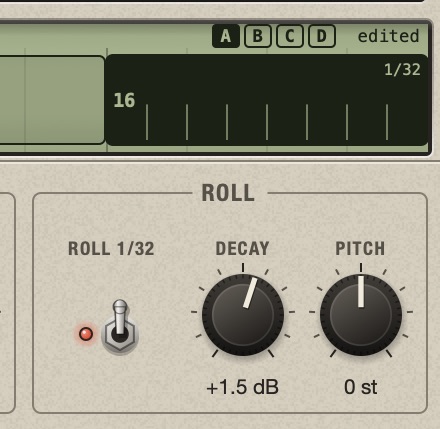
- In the Roll group at the right of the bottom panel, flip the Roll switch up. The label above it shows the rate, for example
ROLL 1/16, and the block shows a tick at each repeat. - Drag the block's right edge to make it longer: more repeats. A rolled block can be longer than its slice in every Timing, and it is never stretched.
In the waveform a roll is drawn as it sounds: the same piece, repeated.
Make a roll fade or rise
The two knobs beside the switch are applied again at every repeat, so their effect adds up along the roll.
- Decay (dB per repeat). At -3 dB the repeats play at 0, -3, -6, -9 dB ...: the roll fades away. At +2 dB each is louder than the one before: a build-up.
- Pitch (semitones per repeat). At +1 the repeats climb one semitone each: after eight repeats the last is seven semitones above the first, a riser. Negative values fall.
Small values go a long way, because they are multiplied by the number of repeats. The ramps stop at the limits of a slice: +24 dB, and 24 semitones up or down; a falling Decay goes on to silence. Double-click a knob to put it back to 0.
Recipes
- Snare roll into the next bar: last beat of the bar, rate 1/32, Decay +1.5 dB.
- Echo of a hit: rate 1/8, block one bar long, Decay -6 dB.
- Riser: rate 1/16, block one or two bars long, Pitch +1.
- Stutter of a word: rate 1/16T, block half a beat long, no Decay.
Change the rate of a roll
Choose another value in the note-value menu, then flip the Roll switch off and on again. A block keeps the rate it had when you switched it on, whatever the menu shows later. This lets different blocks of the same track roll at different rates.
Good to know about rolls
- With several blocks selected, the switch turns them all on or off together.
- A copy of a rolled block is rolled too.
- The rate is counted in the track's bars, and the repeats follow the track's swing.
- One block can have up to 128 repeats.
- Roll is a setting of the block, like its position: each variation has its own, and it cannot be mapped to MIDI.
The idea of swing
A straight rhythm divides the beat into equal steps. Swing makes them unequal: it takes the steps in pairs and plays the second step of each pair late. The first step of the pair gets longer, the second shorter, and the pair as a whole keeps its length, so the beat does not move. This is the shuffle of a drum machine.
The percentage is the share of the pair taken by the first step:
- 50 %: the two steps are equal. No swing.
- 54 to 62 %: a light to medium shuffle, the range most used on drum machines.
- 66 %: the first step is twice as long as the second, the feel of triplets.
- 75 %: three to one, the most.
Add swing
Two menus in the Playback group of the top panel set it, for this track only:
- In the lower menu choose the steps that are paired: Swing 1/16 (sixteenths swing, the usual choice for hip-hop and house) or Swing 1/8 (eighths swing, as in a shuffle or jazz feel).
- In the upper menu choose the amount: 50, 54, 58, 62, 66, 71 or 75 %.
Listen while you change it: it applies at once.
What swing moves, and what it does not
- Everything in between moves too. Swing does not only shift the blocks that sit exactly on the second steps: it bends time inside each pair, so a block a little before or after a step moves in proportion. A straight loop chopped at its transients takes the groove as a whole.
- The order of the blocks never changes, and nothing moves across a pair.
- What you see is where it plays. The lane and the waveform draw the blocks at their swung places. Dragging a block still snaps to the straight grid: you place it straight, and swing bends it.
- It is not an edit of the pattern. Set it back to 50 % and the blocks are exactly where you put them.
- It works in every Timing, on the Sample screen, in the song and in the export.
- It does not depend on the toolbar Grid, and each track has its own: drums can swing while the bass stays straight.
- The amount can be mapped to a MIDI knob (right-click the menu): a controller can then set any value from 50 to 75 %.
A loop that was already played with swing does not need more of it. Use swing on straight material, or after rearranging slices on a straight grid.